Open GoodReader, note how I have organised my folders at left, new users of GoodReader will not see these folders. Select the “Web Downloads” group, so that it appears like this:

Read More…
Posted by: glasskeys | 01/19/2011
Bypass iPad 3G 20MB data limit part 3/5
Posted in iPad, iPad Tutorials | Tags: 3G, GoodReader, iPad Tutorial, Item over 20MB
Posted by: glasskeys | 01/18/2011
Bypass iPad 3G 20MB data limit part 2/5
Download and test GoodReader. The Goodreader icon on my screen has been marked with a red box for illustration.

Read More…
Posted in iPad, iPad Tutorials | Tags: 3G, GoodReader, iPad Tutorial, Item over 20MB
Posted by: glasskeys | 01/17/2011
Bypass iPad 3G 20MB data limit part 1/5
One issue I have encountered over and over whilst trying to download content over iTunes via 3G is the 20MB data limit. My contract (in America) with AT&T states I have unlimited download capability and yet I keep encountering this limit especially whilst downloading video content. Even youtube content is of a lower quality over 3G and is often barely worth watching.
The following screen by screen walk-through will show you how to bypass this restriction using an application called GoodReader. This application by far has been the best money (currently $2.99) I have spent in the App Store.
GoodReader provides a veritable cornucopia of utilities designed to make using an iPad much easier. The ability to interface with Dropbox, FTP servers, as well PDF viewing are just a handful of its features I have found repeatedly useful and are worth the price of the application alone. It also offers some rarely mentioned functionality I have been using to bypass the arbitrary download limit imposed on 3G iPad data users.
For this tutorial you must have GoodReader. Here is the link (Please note that I am *not* affiliated with the fine folks of GoodReader in any fashion).
This tutorial will be a presented in multiple parts covered in the next five or six posts.
********************************************************
UPDATE 07 Dec 2011: I have also found two additional ways to accomplish this. The first is a quick way using a little known fact about Goodreader on iOS using the ghttp method. The second technique makes it possible to transfer massive files in small increments, using the RAR files technique.
Posted in iPad, iPad Tutorials | Tags: 3G, GoodReader, iPad, iPad Tutorial, Item over 20MB
Posted by: glasskeys | 01/06/2011
Your favourite mobile apps?
My favourite mobile application on my new phone is Skype. What is your phone and your best liked apps?
Posted in iPhone Applications | Tags: apps, mobiles
Posted by: glasskeys | 01/05/2011
Thumb space on iPad screen.
Using my iPad I have found that whilst holding the device in my lap I tended to rest my right thumb on the screen. This of course immediately opened the application that my thumb rested upon.
I immediately decided to create a clear space for my thumb and use the bottom right of the screen to for scrolling and “thumb space”.
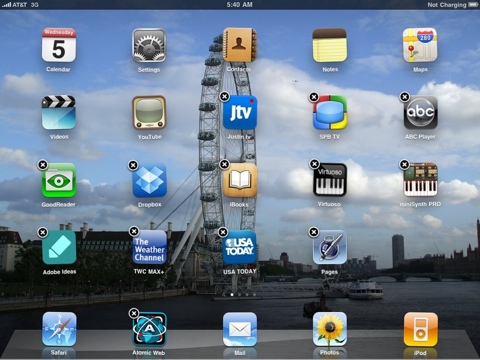
Icon screen with thumb gap at bottom right.
To move the bottom right icon to the next screen, choose any icon and click but do not release. The icons will now appear to “dance” and will have circled X’s in the corners, then with the bottom right icon, slide it with your finger to the right. The next screen of icons will appear and you can place it where you desire.
Click the button (the only real button) on the front of your iPad to stop the icon “dance”. Incidentally, if you want to delete an application, click the circled X’s during the icon “dance”.
Posted by: glasskeys | 01/04/2011
TED iPad application.
I recently found the TED iPad application on iTunes and fell in love with it. It has a clean design, and multiple ways to find content grouped by themes, tags, and newly added or featured videos.
I did find a couple of minor bugs which will most likely be corrected soon in the new version:
A) Using the search feature.
Typing *any* search term into the search entry field causes the application to abruptly crash after you hit the [search] button and will return you to your icon page. This is a serious bug and needs fixed.
B) Delays when initially loading a video.
I use wifi exclusively (except where I get free wireless) and have found that the initial start of a selected video typically loads about 5 seconds of animated video, pauses, then resumes after a 10 second delay. Sometimes I have found that hitting the play button twice “wakes” up the player and the rest of the video plays normally. This is not a deal killer, just a normal experience of us 3G data customers viewing some video content.
So, all in all, I recommend this application, mainly because the 3G video quality is great and much better than viewing the exact same TED video on youtube. The price is great (free), which is amazing considering the calibre of the content on TED.
Posted in iPad Applications | Tags: apps, iPad, Review, TED
Posted by: glasskeys | 12/30/2010
Introduction…
This blog is intended as a resource for touch screen
devices. Reviews and information about hardware, software,
development tools and a forum will be implemented.
Posted in Announcement
 Glasskeys


 glasskeys.com