-

- Turn Cellular Data and Wi-Fi off.
-

- General settings, Usage screen.
-

- Tap Cellular Usage.
-
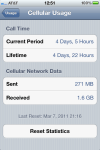
- Tap Usage at top.
-
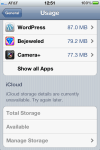
- The screen looks normal…
-

- Display bugs now appear.
Whilst using my iPhone recently, I discovered a display bug that occurs only when the Cellular Data option has been turned off under Network Settings in the Settings application. The minor display error can be reliably duplicated by navigating to General, Usage, then rapidly opening the Cellular Usage menu before the Storage section has time to display application storage data.
Upon returning to the Usage screen and waiting until the application storage data loads, scrolling causes the iCloud storage section text to duplicate and the Battery Usage caption to merge inside of the disabled iCloud Manage Storage text.
Although I have disabled all of the cell data options from my iPads (due to the greedy data plan fees of AT&T), I am curious if any iPad users out there who still use cell data can duplicate these steps to determine if this is an issue on the iPad. With both cell data and Wi-Fi turned off it won’t cost a pence.
 Glasskeys


 glasskeys.com
Leave a comment