-
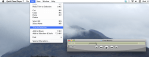
- Select portion of an MP3 file.
-

- Exporting to WAV file.
-

- Create AAC version.
-

- Delete WAV track.
-

- Show track in Finder.
-
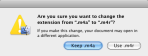
- Create temp copy, with M4R extension.
-

- Drag file to Ringtones.
-

- Select iPhone, click Ringtones tab.
-

- New ringtone appears in the list.
(To view a larger image with a more detailed description tap or click a thumbnail.)
Follow the screenshot walk-through above to create your own custom ringtones for the iPhone and iPad 2. The major steps are as follows: Open your custom ringtone clip file in iTunes, and convert this to a new AAC version. Then make a local file copy of the iTunes AAC file and rename its extension from M4A to M4R. Drag the new M4R file to the ringtones area in iTunes.
After your iPhone or iPad 2 is connected to your computer, click the Ringtones tab in iTunes and Sync the new ringtone to your device.
(If you like this post +1 it!)
 Glasskeys


 glasskeys.com
Leave a comment