
iPad selected, Summary tab.
Open iTunes, attach your iPad to your computer. In the example above, an iPad and an iPhone are attached.
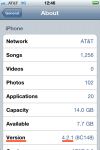
Ensure the proper device is selected at left, click the Summary tab. The Software Version (IOS) is displayed in the center.

 Glasskeys


 glasskeys.com
I complete all the step and the summary tab appear
By: Joy on 08/30/2011
at 5:26 pm
i try to restore my apple ipad but it want unlock and I did everthing step and it still want unlock
By: Floria Tillman on 08/16/2016
at 11:03 pm